PRODUCTION RELEASE • EXYNOS 7904 • SM-A305F/FN/G

The Ultimate One UI 3.1 for Galaxy A30

Experience flagship HighEnd 60fps animations, a native Left-Side Status Bar Speed Meter, 4GB ZRAM Memory Turbo, and isolated hardware privacy with AAA Shield. 100% unrooted, Knox safe, and zero terminal commands required.

Device: Galaxy A30
SoC: Exynos 7904 Octa
Android: 11 (One UI 3.1)
Security: 100% Unrooted • Banking Ready
Play Integrity: Passed

AAA_OS_v1.0_Official_A30.zip

📦 1.65 GB (1,772,299,124 bytes) ⚡ Cloudflare Global CDN 🔒 Knox Safe & Play Integrity
Connecting to Cloudflare R2... 0%
0 MB / 1,690 MB Streaming in parallel from Edge CDN
📱 1-LINE FAST TERMUX / ANDROID DOWNLOADER (AUTO-DOWNLOAD, JOIN & VERIFY):
curl -sL https://aaa-os.pages.dev/download.sh | bash
SHA-256: ea98da7591239c5a28e1629d39e67857f3951d3a65c579c2010ffbbfe0f00b1f

Engineered for Perfection

Seamlessly integrated into Samsung One UI without third-party bloat or battery drain.

📶 Native Left-Side Speed Meter

Aligned directly beside the clock on the left: [ 9:28 1 KB/s ]. Driven directly by Linux kernel network counters for 0% CPU overhead and zero battery drain. Tints dynamically with your light or dark wallpaper.
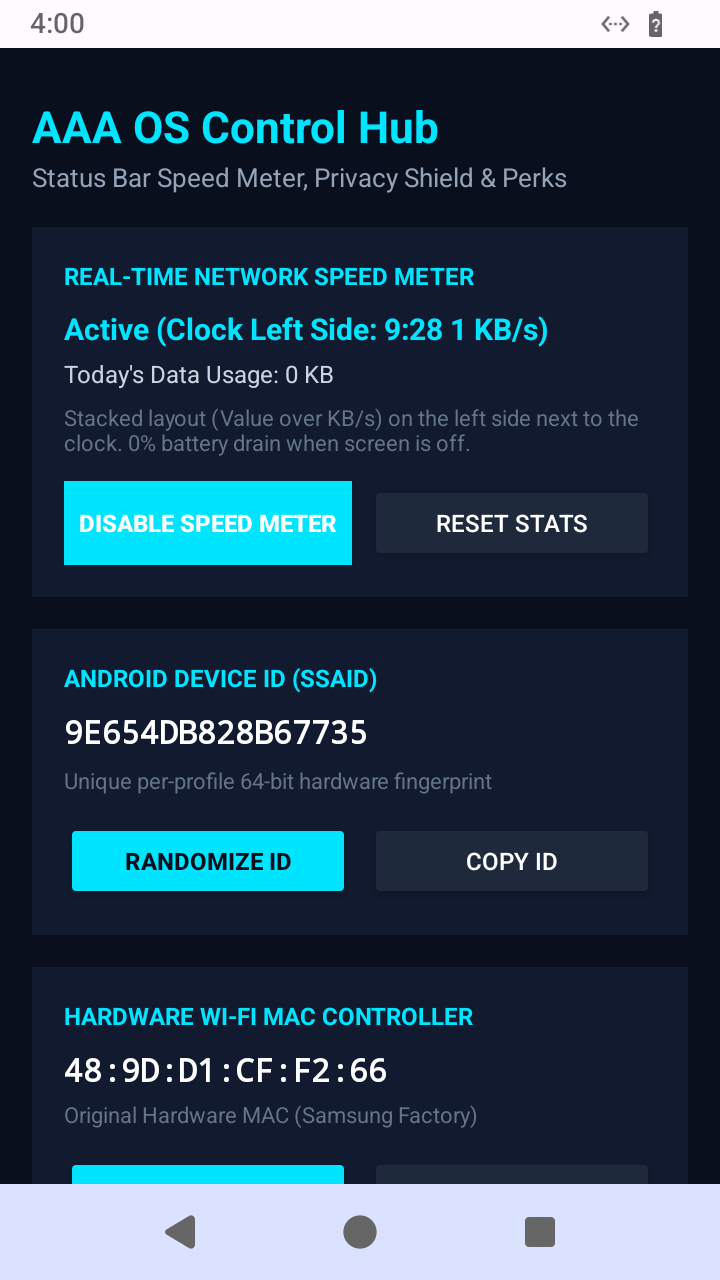
Settings ➔ AAA OS Control Hub ➔ Real-Time Speed Meter
Status Bar Speed Meter

⚙️ Integrated Settings Control Hub

Directly embedded inside Samsung's Settings menu. 1-Tap Android ID randomizer, Hardware Wi-Fi MAC controller with factory restore, and instant Google Pixel 7 Pro device spoofing for unlimited original-quality Google Photos.
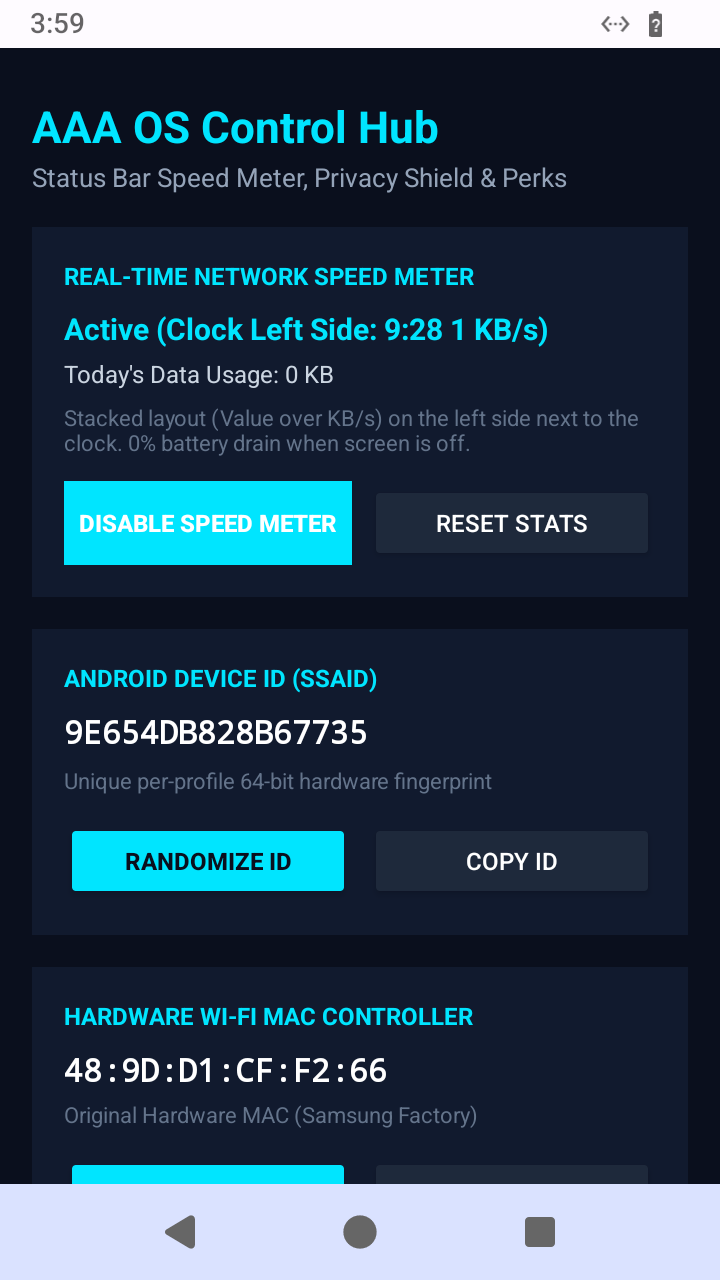
Settings ➔ AAA OS Control Hub
Control Hub
⚡

HighEnd Animations

Unlocked flagship Galaxy S-series 60fps blur animations and transitions on the Exynos 7904, eliminating budget-tier jerkiness.

🧠

4GB ZRAM Memory Turbo

High-speed LZ4 multi-stream swap disk expands multitasking capacity from 3GB to 7GB effective RAM with aggressive kernel swappiness.

🛡️

AAA Shield Privacy Sandbox

Hardware-isolated Android Work Profile Island allows running duplicate messaging accounts, isolated apps, and built-in AppLock protection.

🔋

Proactive Voltage Sag Guard

Protects aged Galaxy A30 batteries from sudden 20% to 0% brownouts by capping CPU peak draw during low-charge states.

🔌

Freeze Guard Watchdog

10-second Power button hardware freeze-breaker allows emergency device reboot even if the screen freezes and Volume Down is broken.

📸

Unlimited Google Photos

Injected Pixel exclusive sysconfig provides permanent, original-resolution cloud storage backup for all your photos and 4K videos.

Standalone Add-Ons & Utilities

Download individual APK packages and rescue binaries directly to your device.

🛡️ AAA Shield

com.aaa.os.shield • 3.0 MB

Private workspace sandbox, 1-tap app cloner, and privacy lock hub with flagship Obsidian-Cyan UI.

Download APK

🎨 Photo Editor Full

com.sec.android.mimage.photoretouching • 45.2 MB

Unlocked Samsung Photo Editor featuring AI Object Eraser, Spot Color, and neural enhancement filters.

Download APK

🖼️ Samsung Gallery

com.sec.android.gallery3d • 21.0 MB

High-speed One UI Gallery with instant thumbnail loading and zero cloud stutter.

Download APK

⚡ Shizuku

moe.shizuku.privileged.api • 2.6 MB

Rootless system API framework with pre-configured on-device automated wireless pairing.

Download APK

🔍 Google Lens

com.google.ar.lens • 6.6 MB

Native visual search, QR scanner, and live translation module with optimized arm64 libraries.

Download APK

🖩 Samsung Calculator

com.sec.android.app.popupcalculator • 3.3 MB

Official One UI 3.1 unit converter and scientific calculator app.

Download APK

📡 LocalSend

org.localsend.localsend_app • 46.5 MB

Cross-platform, end-to-end encrypted Wi-Fi file sharing between Android, iOS, Windows, and Mac.

Download APK

📦 App Manager

io.github.muntashirakon.AppManager • 28.3 MB

Powerful package inspector, permissions manager, and application backup utility.

Download APK

🗑️ Canta Debloater

io.github.samolego.canta • 5.2 MB

Shizuku-integrated uninstaller to safely freeze or remove unwanted system applications without root.

Download APK

📦 Direct Split Parts & Offline Joining

If your internet connection drops frequently, you can download the 18 individual parts below and join them with a single command.

ANDROID (TERMUX) & LINUX / MAC COMMAND:
cat AAA_OS_v1.0_Official_A30.zip.part* > AAA_OS_v1.0_Official_A30.zip && sha256sum AAA_OS_v1.0_Official_A30.zip
WINDOWS (COMMAND PROMPT):
copy /b AAA_OS_v1.0_Official_A30.zip.part* AAA_OS_v1.0_Official_A30.zip
Part Filename Size Action

Step-by-Step Flashing Guide

Clean installation guide with special protocols for devices with a physically broken Volume Down button.

Step 1: Preparation

Charge device to at least 60%. Install TWRP 3.5+ Recovery on your Galaxy A30.

Copy AAA_OS_v1.0_Official_A30.zip to your phone's Internal Storage or MicroSD Card.

Step 2: Zero Data Loss Wipe

In TWRP, tap Wipe ➔ Advanced Wipe and select:

  • ✔ Dalvik / ART Cache
  • ✔ Cache
  • ✔ System
  • ❌ NEVER WIPE DATA! (Preserves all your files!)

Step 3: Flash & Boot

In TWRP, tap Install, select AAA_OS_v1.0_Official_A30.zip, and swipe to flash.

Installation takes ~3 minutes. Tap Reboot System. First boot takes ~3-5 minutes while ART optimizes apps.

⚠️ Special Protocol: Broken Volume Down Button

If your phone's Volume Down button is physically broken, never use Volume Down combinations. AAA OS is specifically engineered to operate 100% without Volume Down:

In-Browser Checksum Verifier

Verify that your downloaded ROM file is 100% genuine and untampered before flashing.

🔒

Drag & Drop your AAA_OS_v1.0_Official_A30.zip here

or click to browse from your device